Showing posts with label widget. Show all posts
Showing posts with label widget. Show all posts

#

Here are the detailed steps to install the related posts widget for blogger with thumbnails
2. Look for
and replace it with
3. Now Find
If you cant find it then try finding this one
Now immediately after any of these lines(whichever you could find) place this code snippet.
5. To edit the title of the widget you can change this line of code
6. To change the default thumbnail, you can edit this line of code
7. To Change the Colour of the Splitter Line , edit
To change the other colours and all you will have to modify the CSS
that is lines
and
Done !!

To increase the look of the page / user can use a link related posts with thumbnail and linking with other similar posts. Users will be tempted to go for the related posts when they are presented attractively with thumbnails. This one also uses the media thumbnails generated by blogger for each post. For displaying the thumbnails,this widget will use the images uploaded for the post using the blogger image uploader(from the post editor) and supports external images also.
Here are the detailed steps to install the related posts widget for blogger with thumbnails
1. First of all Login to your blogger dashboard and navigate to Layout > Edit HTML and check the "Expand Widget Templates" check box.
2. Look for
</head>
and replace it with
<!--Related Posts with thumbnails Scripts and Styles Start--> <!-- remove --><b:if cond='data:blog.pageType == "item"'> <style type="text/css"> #related-posts { float:center; text-transform:none; height:100%; min-height:100%; padding-top:5px; padding-left:5px; } #related-posts h2{ font-size: 1.6em; font-weight: bold; color: black; font-family: Georgia, “Times New Roman”, Times, serif; margin-bottom: 0.75em; margin-top: 0em; padding-top: 0em; } #related-posts a{ color:black; } #related-posts a:hover{ color:black; } #related-posts a:hover { background-color:#d4eaf2; } </style> <script type='text/javascript'> var defaultnoimage="https://blogger.googleusercontent.com/img/b/R29vZ2xl/AVvXsEh7U-s97LdQhiLEFHHncMLI4_aelYhsQHQBXI9NPwLjvgti8gD5jcQZPNTnqq2L2dqFSKH2W8rz0Y1AurBKeRuT6FhazgE8HIQboACro2hIjPS9buJdwbBObUMaVNxNrb62sNZAobG97_s/s400/noimage.png"; var maxresults=5; var splittercolor="#d4eaf2"; var relatedpoststitle="Related Posts"; </script> <script src='http://blogergadgets.googlecode.com/files/related-posts-with-thumbnails-for-blogger-pro.js' type='text/javascript'/> <!-- remove --></b:if> <!--Related Posts with thumbnails Scripts and Styles End--> </head>
3. Now Find
<div class='post-footer-line post-footer-line-1'>
If you cant find it then try finding this one
<p class='post-footer-line post-footer-line-1>
Now immediately after any of these lines(whichever you could find) place this code snippet.
<!-- Related Posts with Thumbnails Code Start--> <!-- remove --><b:if cond='data:blog.pageType == "item"'> <div id='related-posts'> <b:loop values='data:post.labels' var='label'> <b:if cond='data:label.isLast != "true"'> </b:if> <script expr:src='"/feeds/posts/default/-/" + data:label.name + "?alt=json-in-script&callback=related_results_labels_thumbs&max-results=6"' type='text/javascript'/></b:loop> <script type='text/javascript'> removeRelatedDuplicates_thumbs(); printRelatedLabels_thumbs("<data:post.url/>"); </script> </div><div style='clear:both'/> <!-- remove --></b:if> <b:if cond='data:blog.url == data:blog.homepageUrl'><b:if cond='data:post.isFirstPost'> <a href='http://www.bloggerplugins.org/2009/08/related-posts-thumbnails-blogger-widget.html'><img style="border: 0" alt="Related Posts Widget For Blogger with Thumbnails" src="http://image.bloggerplugins.org/blogger-widgets.png" /></a><a href='http://bloggertemplates.bloggerplugins.org/' ><img style="border: 0" alt="Blogger Templates" src="http://image.bloggerplugins.org/blogger-templates.png" /></a> </b:if></b:if> <!-- Related Posts with Thumbnails Code End-->
4. You can adjust the maximum number of related posts being displayed by editing this line in the code.
var maxresults=5;5. To edit the title of the widget you can change this line of code
var relatedpoststitle="Related Posts";6. To change the default thumbnail, you can edit this line of code
var defaultnoimage="https://blogger.googleusercontent.com/img/b/R29vZ2xl/AVvXsEh7U-s97LdQhiLEFHHncMLI4_aelYhsQHQBXI9NPwLjvgti8gD5jcQZPNTnqq2L2dqFSKH2W8rz0Y1AurBKeRuT6FhazgE8HIQboACro2hIjPS9buJdwbBObUMaVNxNrb62sNZAobG97_s/s400/noimage.png";7. To Change the Colour of the Splitter Line , edit
var splittercolor="#d4eaf2";To change the other colours and all you will have to modify the CSS
To display the related posts on every page and not only on the post pages
Just remove the two lines starting with <!-- remove --> from both step 3 and step 2.that is lines
<!-- remove --><b:if cond='data:blog.pageType == "item"'>and
<!-- remove --></b:if>Done !!
[Update : Increase traffic to your best posts by adding related links with Outbrain's Thumbnail Widget. The widget is free, simple to install and will automatically inherit the look and feel of your site. Set your preferences and in less than 60 seconds, your readers will begin seeing thumbnail images linking to great content.]
#


Make Sure that you have checked the Read & Write Option when you Register your Application
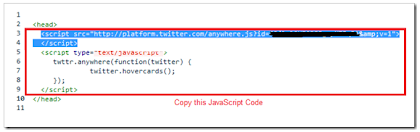
2. When you complete the signup process, you will get some JavaScript codes, with a unique API Key.
Copy out the JavaScript from there(the code in the red box) as shown in this Screenshot.
4. Look for
and paste the copied Twitter JavaScript just above that line and save the template.
5. Now look for
and immediately below that paste the following JavaScript Code and save your template.
note: editable parts are shown in red
Now you should see the Tweet Box on all of your post pages
Since @Twitter released the @AnyWhere Developer Tool. AnyWhere allows you to seamlessly integrate Twitter into your site using a few lines of JavaScript. You can read more about it at @AnyWhere Developer Page. Tweet Box is one such @AnyWhere Application, which allows you to add a 140 char Tweet Box onto your blog.
Add the Tweet Box on a Blogger Blog?
1. Go to the @AnyWhere Developers Page and create an Application there with your blog details.Make Sure that you have checked the Read & Write Option when you Register your Application
2. When you complete the signup process, you will get some JavaScript codes, with a unique API Key.
Copy out the JavaScript from there(the code in the red box) as shown in this Screenshot.
3. Now Login to your Blogger Dashboard and navigate to the Edit HTML Tab under Design and “Expand your Widget Templates”
4. Look for
<head>
and paste the copied Twitter JavaScript just above that line and save the template.
5. Now look for
<data:post.body>
and immediately below that paste the following JavaScript Code and save your template.
<b:if cond='data:blog.pageType == "item"'>
<div id='tweetBox'/>
<script type='text/javascript'>
tweet_link="<data:post.url/>";
twttr.anywhere(function (T) {
T("#tweetBox").tweetBox({
width: 560,
label: "Share & Retweet",
defaultContent: "Retweet @bambangwi <data:post.title/>"+" "+tweet_link
});
});
</script>
</b:if>note: editable parts are shown in red
Now you should see the Tweet Box on all of your post pages
#


2- Adding the CSS
Replace Subscribe, Latest Tricks and Search with your Widget Titles that you will be adding.
4. Now Go To Page Elements. You will see something like this,

Done!
How To Add this Multi Tabbed Widget To Blogger?
I have divided the tutorial in three parts which are,- Adding the JQuery and JavaScript to your Blogger templates
- Adding the CSS
- Adding the HTML
1- Adding the JQuery and JavaScript to your Blogger templates
- Go To Blogger > Design > Edit HTML
- Backup your template
- Search for ]]></b:skin>
- Just below it paste the following code
<script src='http://ajax.googleapis.com/ajax/libs/jquery/1.4.4/jquery.min.js' type='text/javascript'/>
<script type='text/javascript'>
//<![CDATA[
/*
* Superfish v1.4.8 - jQuery menu widget
* Copyright (c) 2008 Joel Birch
*
* Dual licensed under the MIT and GPL licenses:
* http://www.opensource.org/licenses/mit-license.php
* http://www.gnu.org/licenses/gpl.html
*
* CHANGELOG: http://users.tpg.com.au/j_birch/plugins/superfish/changelog.txt
*/
;(function($){
$.fn.superfish = function(op){
var sf = $.fn.superfish,
c = sf.c,
$arrow = $(['<span class="',c.arrowClass,'"> »</span>'].join('')),
over = function(){
var $$ = $(this), menu = getMenu($$);
clearTimeout(menu.sfTimer);
$$.showSuperfishUl().siblings().hideSuperfishUl();
},
out = function(){
var $$ = $(this), menu = getMenu($$), o = sf.op;
clearTimeout(menu.sfTimer);
menu.sfTimer=setTimeout(function(){
o.retainPath=($.inArray($$[0],o.$path)>-1);
$$.hideSuperfishUl();
if (o.$path.length && $$.parents(['li.',o.hoverClass].join('')).length<1){over.call(o.$path);}
},o.delay);
},
getMenu = function($menu){
var menu = $menu.parents(['ul.',c.menuClass,':first'].join(''))[0];
sf.op = sf.o[menu.serial];
return menu;
},
addArrow = function($a){ $a.addClass(c.anchorClass).append($arrow.clone()); };
return this.each(function() {
var s = this.serial = sf.o.length;
var o = $.extend({},sf.defaults,op);
o.$path = $('li.'+o.pathClass,this).slice(0,o.pathLevels).each(function(){
$(this).addClass([o.hoverClass,c.bcClass].join(' '))
.filter('li:has(ul)').removeClass(o.pathClass);
});
sf.o[s] = sf.op = o;
$('li:has(ul)',this)[($.fn.hoverIntent && !o.disableHI) ? 'hoverIntent' : 'hover'](over,out).each(function() {
if (o.autoArrows) addArrow( $('>a:first-child',this) );
})
.not('.'+c.bcClass)
.hideSuperfishUl();
var $a = $('a',this);
$a.each(function(i){
var $li = $a.eq(i).parents('li');
$a.eq(i).focus(function(){over.call($li);}).blur(function(){out.call($li);});
});
o.onInit.call(this);
}).each(function() {
var menuClasses = [c.menuClass];
if (sf.op.dropShadows && !($.browser.msie && $.browser.version < 7)) menuClasses.push(c.shadowClass);
$(this).addClass(menuClasses.join(' '));
});
};
var sf = $.fn.superfish;
sf.o = [];
sf.op = {};
sf.IE7fix = function(){
var o = sf.op;
if ($.browser.msie && $.browser.version > 6 && o.dropShadows && o.animation.opacity!=undefined)
this.toggleClass(sf.c.shadowClass+'-off');
};
sf.c = {
bcClass : 'sf-breadcrumb',
menuClass : 'sf-js-enabled',
anchorClass : 'sf-with-ul',
arrowClass : 'sf-sub-indicator',
shadowClass : 'sf-shadow'
};
sf.defaults = {
hoverClass : 'sfHover',
pathClass : 'overideThisToUse',
pathLevels : 1,
delay : 800,
animation : {opacity:'show'},
speed : 'normal',
autoArrows : true,
dropShadows : true,
disableHI : false, // true disables hoverIntent detection
onInit : function(){}, // callback functions
onBeforeShow: function(){},
onShow : function(){},
onHide : function(){}
};
$.fn.extend({
hideSuperfishUl : function(){
var o = sf.op,
not = (o.retainPath===true) ? o.$path : '';
o.retainPath = false;
var $ul = $(['li.',o.hoverClass].join(''),this).add(this).not(not).removeClass(o.hoverClass)
.find('>ul').hide().css('visibility','hidden');
o.onHide.call($ul);
return this;
},
showSuperfishUl : function(){
var o = sf.op,
sh = sf.c.shadowClass+'-off',
$ul = this.addClass(o.hoverClass)
.find('>ul:hidden').css('visibility','visible');
sf.IE7fix.call($ul);
o.onBeforeShow.call($ul);
$ul.animate(o.animation,o.speed,function(){ sf.IE7fix.call($ul); o.onShow.call($ul); });
return this;
}
});
})(jQuery);
//]]>
</script>
<script type='text/javascript'>
//<![CDATA[
/*
* jQuery Cycle Plugin (with Transition Definitions)
* Examples and documentation at: http://jquery.malsup.com/cycle/
* Copyright (c) 2007-2010 M. Alsup
* Version: 2.88 (08-JUN-2010)
* Dual licensed under the MIT and GPL licenses.
* http://jquery.malsup.com/license.html
* Requires: jQuery v1.2.6 or later
*/
(function($){var ver="2.88";if($.support==undefined){$.support={opacity:!($.browser.msie)};}function debug(s){if($.fn.cycle.debug){log(s);}}function log(){if(window.console&&window.console.log){window.console.log("[cycle] "+Array.prototype.join.call(arguments," "));}}$.fn.cycle=function(options,arg2){var o={s:this.selector,c:this.context};if(this.length===0&&options!="stop"){if(!$.isReady&&o.s){log("DOM not ready, queuing slideshow");$(function(){$(o.s,o.c).cycle(options,arg2);});return this;}log("terminating; zero elements found by selector"+($.isReady?"":" (DOM not ready)"));return this;}return this.each(function(){var opts=handleArguments(this,options,arg2);if(opts===false){return;}opts.updateActivePagerLink=opts.updateActivePagerLink||$.fn.cycle.updateActivePagerLink;if(this.cycleTimeout){clearTimeout(this.cycleTimeout);}this.cycleTimeout=this.cyclePause=0;var $cont=$(this);var $slides=opts.slideExpr?$(opts.slideExpr,this):$cont.children();var els=$slides.get();if(els.length<2){log("terminating; too few slides: "+els.length);return;}var opts2=buildOptions($cont,$slides,els,opts,o);if(opts2===false){return;}var startTime=opts2.continuous?10:getTimeout(els[opts2.currSlide],els[opts2.nextSlide],opts2,!opts2.rev);if(startTime){startTime+=(opts2.delay||0);if(startTime<10){startTime=10;}debug("first timeout: "+startTime);this.cycleTimeout=setTimeout(function(){go(els,opts2,0,(!opts2.rev&&!opts.backwards));},startTime);}});};function handleArguments(cont,options,arg2){if(cont.cycleStop==undefined){cont.cycleStop=0;}if(options===undefined||options===null){options={};}if(options.constructor==String){switch(options){case"destroy":case"stop":var opts=$(cont).data("cycle.opts");if(!opts){return false;}cont.cycleStop++;if(cont.cycleTimeout){clearTimeout(cont.cycleTimeout);}cont.cycleTimeout=0;$(cont).removeData("cycle.opts");if(options=="destroy"){destroy(opts);}return false;case"toggle":cont.cyclePause=(cont.cyclePause===1)?0:1;checkInstantResume(cont.cyclePause,arg2,cont);return false;case"pause":cont.cyclePause=1;return false;case"resume":cont.cyclePause=0;checkInstantResume(false,arg2,cont);return false;case"prev":case"next":var opts=$(cont).data("cycle.opts");if(!opts){log('options not found, "prev/next" ignored');return false;}$.fn.cycle[options](opts);return false;default:options={fx:options};}return options;}else{if(options.constructor==Number){var num=options;options=$(cont).data("cycle.opts");if(!options){log("options not found, can not advance slide");return false;}if(num<0||num>=options.elements.length){log("invalid slide index: "+num);return false;}options.nextSlide=num;if(cont.cycleTimeout){clearTimeout(cont.cycleTimeout);cont.cycleTimeout=0;}if(typeof arg2=="string"){options.oneTimeFx=arg2;}go(options.elements,options,1,num>=options.currSlide);return false;}}return options;function checkInstantResume(isPaused,arg2,cont){if(!isPaused&&arg2===true){var options=$(cont).data("cycle.opts");if(!options){log("options not found, can not resume");return false;}if(cont.cycleTimeout){clearTimeout(cont.cycleTimeout);cont.cycleTimeout=0;}go(options.elements,options,1,(!opts.rev&&!opts.backwards));}}}function removeFilter(el,opts){if(!$.support.opacity&&opts.cleartype&&el.style.filter){try{el.style.removeAttribute("filter");}catch(smother){}}}function destroy(opts){if(opts.next){$(opts.next).unbind(opts.prevNextEvent);}if(opts.prev){$(opts.prev).unbind(opts.prevNextEvent);}if(opts.pager||opts.pagerAnchorBuilder){$.each(opts.pagerAnchors||[],function(){this.unbind().remove();});}opts.pagerAnchors=null;if(opts.destroy){opts.destroy(opts);}}function buildOptions($cont,$slides,els,options,o){var opts=$.extend({},$.fn.cycle.defaults,options||{},$.metadata?$cont.metadata():$.meta?$cont.data():{});if(opts.autostop){opts.countdown=opts.autostopCount||els.length;}var cont=$cont[0];$cont.data("cycle.opts",opts);opts.$cont=$cont;opts.stopCount=cont.cycleStop;opts.elements=els;opts.before=opts.before?[opts.before]:[];opts.after=opts.after?[opts.after]:[];opts.after.unshift(function(){opts.busy=0;});if(!$.support.opacity&&opts.cleartype){opts.after.push(function(){removeFilter(this,opts);});}if(opts.continuous){opts.after.push(function(){go(els,opts,0,(!opts.rev&&!opts.backwards));});}saveOriginalOpts(opts);if(!$.support.opacity&&opts.cleartype&&!opts.cleartypeNoBg){clearTypeFix($slides);}if($cont.css("position")=="static"){$cont.css("position","relative");}if(opts.width){$cont.width(opts.width);}if(opts.height&&opts.height!="auto"){$cont.height(opts.height);}if(opts.startingSlide){opts.startingSlide=parseInt(opts.startingSlide);}else{if(opts.backwards){opts.startingSlide=els.length-1;}}if(opts.random){opts.randomMap=[];for(var i=0;i<els.length;i++){opts.randomMap.push(i);}opts.randomMap.sort(function(a,b){return Math.random()-0.5;});opts.randomIndex=1;opts.startingSlide=opts.randomMap[1];}else{if(opts.startingSlide>=els.length){opts.startingSlide=0;}}opts.currSlide=opts.startingSlide||0;var first=opts.startingSlide;$slides.css({position:"absolute",top:0,left:0}).hide().each(function(i){var z;if(opts.backwards){z=first?i<=first?els.length+(i-first):first-i:els.length-i;}else{z=first?i>=first?els.length-(i-first):first-i:els.length-i;}$(this).css("z-index",z);});$(els[first]).css("opacity",1).show();removeFilter(els[first],opts);if(opts.fit&&opts.width){$slides.width(opts.width);}if(opts.fit&&opts.height&&opts.height!="auto"){$slides.height(opts.height);}var reshape=opts.containerResize&&!$cont.innerHeight();if(reshape){var maxw=0,maxh=0;for(var j=0;j<els.length;j++){var $e=$(els[j]),e=$e[0],w=$e.outerWidth(),h=$e.outerHeight();if(!w){w=e.offsetWidth||e.width||$e.attr("width");}if(!h){h=e.offsetHeight||e.height||$e.attr("height");}maxw=w>maxw?w:maxw;maxh=h>maxh?h:maxh;}if(maxw>0&&maxh>0){$cont.css({width:maxw+"px",height:maxh+"px"});}}if(opts.pause){$cont.hover(function(){this.cyclePause++;},function(){this.cyclePause--;});}if(supportMultiTransitions(opts)===false){return false;}var requeue=false;options.requeueAttempts=options.requeueAttempts||0;$slides.each(function(){var $el=$(this);this.cycleH=(opts.fit&&opts.height)?opts.height:($el.height()||this.offsetHeight||this.height||$el.attr("height")||0);this.cycleW=(opts.fit&&opts.width)?opts.width:($el.width()||this.offsetWidth||this.width||$el.attr("width")||0);if($el.is("img")){var loadingIE=($.browser.msie&&this.cycleW==28&&this.cycleH==30&&!this.complete);var loadingFF=($.browser.mozilla&&this.cycleW==34&&this.cycleH==19&&!this.complete);var loadingOp=($.browser.opera&&((this.cycleW==42&&this.cycleH==19)||(this.cycleW==37&&this.cycleH==17))&&!this.complete);var loadingOther=(this.cycleH==0&&this.cycleW==0&&!this.complete);if(loadingIE||loadingFF||loadingOp||loadingOther){if(o.s&&opts.requeueOnImageNotLoaded&&++options.requeueAttempts<100){log(options.requeueAttempts," - img slide not loaded, requeuing slideshow: ",this.src,this.cycleW,this.cycleH);setTimeout(function(){$(o.s,o.c).cycle(options);},opts.requeueTimeout);requeue=true;return false;}else{log("could not determine size of image: "+this.src,this.cycleW,this.cycleH);}}}return true;});if(requeue){return false;}opts.cssBefore=opts.cssBefore||{};opts.animIn=opts.animIn||{};opts.animOut=opts.animOut||{};$slides.not(":eq("+first+")").css(opts.cssBefore);if(opts.cssFirst){$($slides[first]).css(opts.cssFirst);}if(opts.timeout){opts.timeout=parseInt(opts.timeout);if(opts.speed.constructor==String){opts.speed=$.fx.speeds[opts.speed]||parseInt(opts.speed);}if(!opts.sync){opts.speed=opts.speed/2;}var buffer=opts.fx=="shuffle"?500:250;while((opts.timeout-opts.speed)<buffer){opts.timeout+=opts.speed;}}if(opts.easing){opts.easeIn=opts.easeOut=opts.easing;}if(!opts.speedIn){opts.speedIn=opts.speed;}if(!opts.speedOut){opts.speedOut=opts.speed;}opts.slideCount=els.length;opts.currSlide=opts.lastSlide=first;if(opts.random){if(++opts.randomIndex==els.length){opts.randomIndex=0;}opts.nextSlide=opts.randomMap[opts.randomIndex];}else{if(opts.backwards){opts.nextSlide=opts.startingSlide==0?(els.length-1):opts.startingSlide-1;}else{opts.nextSlide=opts.startingSlide>=(els.length-1)?0:opts.startingSlide+1;}}if(!opts.multiFx){var init=$.fn.cycle.transitions[opts.fx];if($.isFunction(init)){init($cont,$slides,opts);}else{if(opts.fx!="custom"&&!opts.multiFx){log("unknown transition: "+opts.fx,"; slideshow terminating");return false;}}}var e0=$slides[first];if(opts.before.length){opts.before[0].apply(e0,[e0,e0,opts,true]);}if(opts.after.length>1){opts.after[1].apply(e0,[e0,e0,opts,true]);}if(opts.next){$(opts.next).bind(opts.prevNextEvent,function(){return advance(opts,opts.rev?-1:1);});}if(opts.prev){$(opts.prev).bind(opts.prevNextEvent,function(){return advance(opts,opts.rev?1:-1);});}if(opts.pager||opts.pagerAnchorBuilder){buildPager(els,opts);}exposeAddSlide(opts,els);return opts;}function saveOriginalOpts(opts){opts.original={before:[],after:[]};opts.original.cssBefore=$.extend({},opts.cssBefore);opts.original.cssAfter=$.extend({},opts.cssAfter);opts.original.animIn=$.extend({},opts.animIn);opts.original.animOut=$.extend({},opts.animOut);$.each(opts.before,function(){opts.original.before.push(this);});$.each(opts.after,function(){opts.original.after.push(this);});}function supportMultiTransitions(opts){var i,tx,txs=$.fn.cycle.transitions;if(opts.fx.indexOf(",")>0){opts.multiFx=true;opts.fxs=opts.fx.replace(/\s*/g,"").split(",");for(i=0;i<opts.fxs.length;i++){var fx=opts.fxs[i];tx=txs[fx];if(!tx||!txs.hasOwnProperty(fx)||!$.isFunction(tx)){log("discarding unknown transition: ",fx);opts.fxs.splice(i,1);i--;}}if(!opts.fxs.length){log("No valid transitions named; slideshow terminating.");return false;}}else{if(opts.fx=="all"){opts.multiFx=true;opts.fxs=[];for(p in txs){tx=txs[p];if(txs.hasOwnProperty(p)&&$.isFunction(tx)){opts.fxs.push(p);}}}}if(opts.multiFx&&opts.randomizeEffects){var r1=Math.floor(Math.random()*20)+30;for(i=0;i<r1;i++){var r2=Math.floor(Math.random()*opts.fxs.length);opts.fxs.push(opts.fxs.splice(r2,1)[0]);}debug("randomized fx sequence: ",opts.fxs);}return true;}function exposeAddSlide(opts,els){opts.addSlide=function(newSlide,prepend){var $s=$(newSlide),s=$s[0];if(!opts.autostopCount){opts.countdown++;}els[prepend?"unshift":"push"](s);if(opts.els){opts.els[prepend?"unshift":"push"](s);}opts.slideCount=els.length;$s.css("position","absolute");$s[prepend?"prependTo":"appendTo"](opts.$cont);if(prepend){opts.currSlide++;opts.nextSlide++;}if(!$.support.opacity&&opts.cleartype&&!opts.cleartypeNoBg){clearTypeFix($s);}if(opts.fit&&opts.width){$s.width(opts.width);}if(opts.fit&&opts.height&&opts.height!="auto"){$slides.height(opts.height);}s.cycleH=(opts.fit&&opts.height)?opts.height:$s.height();s.cycleW=(opts.fit&&opts.width)?opts.width:$s.width();$s.css(opts.cssBefore);if(opts.pager||opts.pagerAnchorBuilder){$.fn.cycle.createPagerAnchor(els.length-1,s,$(opts.pager),els,opts);}if($.isFunction(opts.onAddSlide)){opts.onAddSlide($s);}else{$s.hide();}};}$.fn.cycle.resetState=function(opts,fx){fx=fx||opts.fx;opts.before=[];opts.after=[];opts.cssBefore=$.extend({},opts.original.cssBefore);opts.cssAfter=$.extend({},opts.original.cssAfter);opts.animIn=$.extend({},opts.original.animIn);opts.animOut=$.extend({},opts.original.animOut);opts.fxFn=null;$.each(opts.original.before,function(){opts.before.push(this);});$.each(opts.original.after,function(){opts.after.push(this);});var init=$.fn.cycle.transitions[fx];if($.isFunction(init)){init(opts.$cont,$(opts.elements),opts);}};function go(els,opts,manual,fwd){if(manual&&opts.busy&&opts.manualTrump){debug("manualTrump in go(), stopping active transition");$(els).stop(true,true);opts.busy=false;}if(opts.busy){debug("transition active, ignoring new tx request");return;}var p=opts.$cont[0],curr=els[opts.currSlide],next=els[opts.nextSlide];if(p.cycleStop!=opts.stopCount||p.cycleTimeout===0&&!manual){return;}if(!manual&&!p.cyclePause&&!opts.bounce&&((opts.autostop&&(--opts.countdown<=0))||(opts.nowrap&&!opts.random&&opts.nextSlide<opts.currSlide))){if(opts.end){opts.end(opts);}return;}var changed=false;if((manual||!p.cyclePause)&&(opts.nextSlide!=opts.currSlide)){changed=true;var fx=opts.fx;curr.cycleH=curr.cycleH||$(curr).height();curr.cycleW=curr.cycleW||$(curr).width();next.cycleH=next.cycleH||$(next).height();next.cycleW=next.cycleW||$(next).width();if(opts.multiFx){if(opts.lastFx==undefined||++opts.lastFx>=opts.fxs.length){opts.lastFx=0;}fx=opts.fxs[opts.lastFx];opts.currFx=fx;}if(opts.oneTimeFx){fx=opts.oneTimeFx;opts.oneTimeFx=null;}$.fn.cycle.resetState(opts,fx);if(opts.before.length){$.each(opts.before,function(i,o){if(p.cycleStop!=opts.stopCount){return;}o.apply(next,[curr,next,opts,fwd]);});}var after=function(){$.each(opts.after,function(i,o){if(p.cycleStop!=opts.stopCount){return;}o.apply(next,[curr,next,opts,fwd]);});};debug("tx firing; currSlide: "+opts.currSlide+"; nextSlide: "+opts.nextSlide);opts.busy=1;if(opts.fxFn){opts.fxFn(curr,next,opts,after,fwd,manual&&opts.fastOnEvent);}else{if($.isFunction($.fn.cycle[opts.fx])){$.fn.cycle[opts.fx](curr,next,opts,after,fwd,manual&&opts.fastOnEvent);}else{$.fn.cycle.custom(curr,next,opts,after,fwd,manual&&opts.fastOnEvent);}}}if(changed||opts.nextSlide==opts.currSlide){opts.lastSlide=opts.currSlide;if(opts.random){opts.currSlide=opts.nextSlide;if(++opts.randomIndex==els.length){opts.randomIndex=0;}opts.nextSlide=opts.randomMap[opts.randomIndex];if(opts.nextSlide==opts.currSlide){opts.nextSlide=(opts.currSlide==opts.slideCount-1)?0:opts.currSlide+1;}}else{if(opts.backwards){var roll=(opts.nextSlide-1)<0;if(roll&&opts.bounce){opts.backwards=!opts.backwards;opts.nextSlide=1;opts.currSlide=0;}else{opts.nextSlide=roll?(els.length-1):opts.nextSlide-1;opts.currSlide=roll?0:opts.nextSlide+1;}}else{var roll=(opts.nextSlide+1)==els.length;if(roll&&opts.bounce){opts.backwards=!opts.backwards;opts.nextSlide=els.length-2;opts.currSlide=els.length-1;}else{opts.nextSlide=roll?0:opts.nextSlide+1;opts.currSlide=roll?els.length-1:opts.nextSlide-1;}}}}if(changed&&opts.pager){opts.updateActivePagerLink(opts.pager,opts.currSlide,opts.activePagerClass);}var ms=0;if(opts.timeout&&!opts.continuous){ms=getTimeout(els[opts.currSlide],els[opts.nextSlide],opts,fwd);}else{if(opts.continuous&&p.cyclePause){ms=10;}}if(ms>0){p.cycleTimeout=setTimeout(function(){go(els,opts,0,(!opts.rev&&!opts.backwards));},ms);}}$.fn.cycle.updateActivePagerLink=function(pager,currSlide,clsName){$(pager).each(function(){$(this).children().removeClass(clsName).eq(currSlide).addClass(clsName);});};function getTimeout(curr,next,opts,fwd){if(opts.timeoutFn){var t=opts.timeoutFn.call(curr,curr,next,opts,fwd);while((t-opts.speed)<250){t+=opts.speed;}debug("calculated timeout: "+t+"; speed: "+opts.speed);if(t!==false){return t;}}return opts.timeout;}$.fn.cycle.next=function(opts){advance(opts,opts.rev?-1:1);};$.fn.cycle.prev=function(opts){advance(opts,opts.rev?1:-1);};function advance(opts,val){var els=opts.elements;var p=opts.$cont[0],timeout=p.cycleTimeout;if(timeout){clearTimeout(timeout);p.cycleTimeout=0;}if(opts.random&&val<0){opts.randomIndex--;if(--opts.randomIndex==-2){opts.randomIndex=els.length-2;}else{if(opts.randomIndex==-1){opts.randomIndex=els.length-1;}}opts.nextSlide=opts.randomMap[opts.randomIndex];}else{if(opts.random){opts.nextSlide=opts.randomMap[opts.randomIndex];}else{opts.nextSlide=opts.currSlide+val;if(opts.nextSlide<0){if(opts.nowrap){return false;}opts.nextSlide=els.length-1;}else{if(opts.nextSlide>=els.length){if(opts.nowrap){return false;}opts.nextSlide=0;}}}}var cb=opts.onPrevNextEvent||opts.prevNextClick;if($.isFunction(cb)){cb(val>0,opts.nextSlide,els[opts.nextSlide]);}go(els,opts,1,val>=0);return false;}function buildPager(els,opts){var $p=$(opts.pager);$.each(els,function(i,o){$.fn.cycle.createPagerAnchor(i,o,$p,els,opts);});opts.updateActivePagerLink(opts.pager,opts.startingSlide,opts.activePagerClass);}$.fn.cycle.createPagerAnchor=function(i,el,$p,els,opts){var a;if($.isFunction(opts.pagerAnchorBuilder)){a=opts.pagerAnchorBuilder(i,el);debug("pagerAnchorBuilder("+i+", el) returned: "+a);}else{a='<a href="#">'+(i+1)+"</a>";}if(!a){return;}var $a=$(a);if($a.parents("body").length===0){var arr=[];if($p.length>1){$p.each(function(){var $clone=$a.clone(true);$(this).append($clone);arr.push($clone[0]);});$a=$(arr);}else{$a.appendTo($p);}}opts.pagerAnchors=opts.pagerAnchors||[];opts.pagerAnchors.push($a);$a.bind(opts.pagerEvent,function(e){e.preventDefault();opts.nextSlide=i;var p=opts.$cont[0],timeout=p.cycleTimeout;if(timeout){clearTimeout(timeout);p.cycleTimeout=0;}var cb=opts.onPagerEvent||opts.pagerClick;if($.isFunction(cb)){cb(opts.nextSlide,els[opts.nextSlide]);}go(els,opts,1,opts.currSlide<i);});if(!/^click/.test(opts.pagerEvent)&&!opts.allowPagerClickBubble){$a.bind("click.cycle",function(){return false;});}if(opts.pauseOnPagerHover){$a.hover(function(){opts.$cont[0].cyclePause++;},function(){opts.$cont[0].cyclePause--;});}};$.fn.cycle.hopsFromLast=function(opts,fwd){var hops,l=opts.lastSlide,c=opts.currSlide;if(fwd){hops=c>l?c-l:opts.slideCount-l;}else{hops=c<l?l-c:l+opts.slideCount-c;}return hops;};function clearTypeFix($slides){debug("applying clearType background-color hack");function hex(s){s=parseInt(s).toString(16);return s.length<2?"0"+s:s;}function getBg(e){for(;e&&e.nodeName.toLowerCase()!="html";e=e.parentNode){var v=$.css(e,"background-color");if(v.indexOf("rgb")>=0){var rgb=v.match(/\d+/g);return"#"+hex(rgb[0])+hex(rgb[1])+hex(rgb[2]);}if(v&&v!="transparent"){return v;}}return"#ffffff";}$slides.each(function(){$(this).css("background-color",getBg(this));});}$.fn.cycle.commonReset=function(curr,next,opts,w,h,rev){$(opts.elements).not(curr).hide();opts.cssBefore.opacity=1;opts.cssBefore.display="block";if(w!==false&&next.cycleW>0){opts.cssBefore.width=next.cycleW;}if(h!==false&&next.cycleH>0){opts.cssBefore.height=next.cycleH;}opts.cssAfter=opts.cssAfter||{};opts.cssAfter.display="none";$(curr).css("zIndex",opts.slideCount+(rev===true?1:0));$(next).css("zIndex",opts.slideCount+(rev===true?0:1));};$.fn.cycle.custom=function(curr,next,opts,cb,fwd,speedOverride){var $l=$(curr),$n=$(next);var speedIn=opts.speedIn,speedOut=opts.speedOut,easeIn=opts.easeIn,easeOut=opts.easeOut;$n.css(opts.cssBefore);if(speedOverride){if(typeof speedOverride=="number"){speedIn=speedOut=speedOverride;}else{speedIn=speedOut=1;}easeIn=easeOut=null;}var fn=function(){$n.animate(opts.animIn,speedIn,easeIn,cb);};$l.animate(opts.animOut,speedOut,easeOut,function(){if(opts.cssAfter){$l.css(opts.cssAfter);}if(!opts.sync){fn();}});if(opts.sync){fn();}};$.fn.cycle.transitions={fade:function($cont,$slides,opts){$slides.not(":eq("+opts.currSlide+")").css("opacity",0);opts.before.push(function(curr,next,opts){$.fn.cycle.commonReset(curr,next,opts);opts.cssBefore.opacity=0;});opts.animIn={opacity:1};opts.animOut={opacity:0};opts.cssBefore={top:0,left:0};}};$.fn.cycle.ver=function(){return ver;};$.fn.cycle.defaults={fx:"fade",timeout:4000,timeoutFn:null,continuous:0,speed:1000,speedIn:null,speedOut:null,next:null,prev:null,onPrevNextEvent:null,prevNextEvent:"click.cycle",pager:null,onPagerEvent:null,pagerEvent:"click.cycle",allowPagerClickBubble:false,pagerAnchorBuilder:null,before:null,after:null,end:null,easing:null,easeIn:null,easeOut:null,shuffle:null,animIn:null,animOut:null,cssBefore:null,cssAfter:null,fxFn:null,height:"auto",startingSlide:0,sync:1,random:0,fit:0,containerResize:1,pause:0,pauseOnPagerHover:0,autostop:0,autostopCount:0,delay:0,slideExpr:null,cleartype:!$.support.opacity,cleartypeNoBg:false,nowrap:0,fastOnEvent:0,randomizeEffects:1,rev:0,manualTrump:true,requeueOnImageNotLoaded:true,requeueTimeout:250,activePagerClass:"activeSlide",updateActivePagerLink:null,backwards:false};})(jQuery);
/*
* jQuery Cycle Plugin Transition Definitions
* This script is a plugin for the jQuery Cycle Plugin
* Examples and documentation at: http://malsup.com/jquery/cycle/
* Copyright (c) 2007-2010 M. Alsup
* Version: 2.72
* Dual licensed under the MIT and GPL licenses:
* http://www.opensource.org/licenses/mit-license.php
* http://www.gnu.org/licenses/gpl.html
*/
(function($){$.fn.cycle.transitions.none=function($cont,$slides,opts){opts.fxFn=function(curr,next,opts,after){$(next).show();$(curr).hide();after();};};$.fn.cycle.transitions.scrollUp=function($cont,$slides,opts){$cont.css("overflow","hidden");opts.before.push($.fn.cycle.commonReset);var h=$cont.height();opts.cssBefore={top:h,left:0};opts.cssFirst={top:0};opts.animIn={top:0};opts.animOut={top:-h};};$.fn.cycle.transitions.scrollDown=function($cont,$slides,opts){$cont.css("overflow","hidden");opts.before.push($.fn.cycle.commonReset);var h=$cont.height();opts.cssFirst={top:0};opts.cssBefore={top:-h,left:0};opts.animIn={top:0};opts.animOut={top:h};};$.fn.cycle.transitions.scrollLeft=function($cont,$slides,opts){$cont.css("overflow","hidden");opts.before.push($.fn.cycle.commonReset);var w=$cont.width();opts.cssFirst={left:0};opts.cssBefore={left:w,top:0};opts.animIn={left:0};opts.animOut={left:0-w};};$.fn.cycle.transitions.scrollRight=function($cont,$slides,opts){$cont.css("overflow","hidden");opts.before.push($.fn.cycle.commonReset);var w=$cont.width();opts.cssFirst={left:0};opts.cssBefore={left:-w,top:0};opts.animIn={left:0};opts.animOut={left:w};};$.fn.cycle.transitions.scrollHorz=function($cont,$slides,opts){$cont.css("overflow","hidden").width();opts.before.push(function(curr,next,opts,fwd){$.fn.cycle.commonReset(curr,next,opts);opts.cssBefore.left=fwd?(next.cycleW-1):(1-next.cycleW);opts.animOut.left=fwd?-curr.cycleW:curr.cycleW;});opts.cssFirst={left:0};opts.cssBefore={top:0};opts.animIn={left:0};opts.animOut={top:0};};$.fn.cycle.transitions.scrollVert=function($cont,$slides,opts){$cont.css("overflow","hidden");opts.before.push(function(curr,next,opts,fwd){$.fn.cycle.commonReset(curr,next,opts);opts.cssBefore.top=fwd?(1-next.cycleH):(next.cycleH-1);opts.animOut.top=fwd?curr.cycleH:-curr.cycleH;});opts.cssFirst={top:0};opts.cssBefore={left:0};opts.animIn={top:0};opts.animOut={left:0};};$.fn.cycle.transitions.slideX=function($cont,$slides,opts){opts.before.push(function(curr,next,opts){$(opts.elements).not(curr).hide();$.fn.cycle.commonReset(curr,next,opts,false,true);opts.animIn.width=next.cycleW;});opts.cssBefore={left:0,top:0,width:0};opts.animIn={width:"show"};opts.animOut={width:0};};$.fn.cycle.transitions.slideY=function($cont,$slides,opts){opts.before.push(function(curr,next,opts){$(opts.elements).not(curr).hide();$.fn.cycle.commonReset(curr,next,opts,true,false);opts.animIn.height=next.cycleH;});opts.cssBefore={left:0,top:0,height:0};opts.animIn={height:"show"};opts.animOut={height:0};};$.fn.cycle.transitions.shuffle=function($cont,$slides,opts){var i,w=$cont.css("overflow","visible").width();$slides.css({left:0,top:0});opts.before.push(function(curr,next,opts){$.fn.cycle.commonReset(curr,next,opts,true,true,true);});if(!opts.speedAdjusted){opts.speed=opts.speed/2;opts.speedAdjusted=true;}opts.random=0;opts.shuffle=opts.shuffle||{left:-w,top:15};opts.els=[];for(i=0;i<$slides.length;i++){opts.els.push($slides[i]);}for(i=0;i<opts.currSlide;i++){opts.els.push(opts.els.shift());}opts.fxFn=function(curr,next,opts,cb,fwd){var $el=fwd?$(curr):$(next);$(next).css(opts.cssBefore);var count=opts.slideCount;$el.animate(opts.shuffle,opts.speedIn,opts.easeIn,function(){var hops=$.fn.cycle.hopsFromLast(opts,fwd);for(var k=0;k<hops;k++){fwd?opts.els.push(opts.els.shift()):opts.els.unshift(opts.els.pop());}if(fwd){for(var i=0,len=opts.els.length;i<len;i++){$(opts.els[i]).css("z-index",len-i+count);}}else{var z=$(curr).css("z-index");$el.css("z-index",parseInt(z)+1+count);}$el.animate({left:0,top:0},opts.speedOut,opts.easeOut,function(){$(fwd?this:curr).hide();if(cb){cb();}});});};opts.cssBefore={display:"block",opacity:1,top:0,left:0};};$.fn.cycle.transitions.turnUp=function($cont,$slides,opts){opts.before.push(function(curr,next,opts){$.fn.cycle.commonReset(curr,next,opts,true,false);opts.cssBefore.top=next.cycleH;opts.animIn.height=next.cycleH;});opts.cssFirst={top:0};opts.cssBefore={left:0,height:0};opts.animIn={top:0};opts.animOut={height:0};};$.fn.cycle.transitions.turnDown=function($cont,$slides,opts){opts.before.push(function(curr,next,opts){$.fn.cycle.commonReset(curr,next,opts,true,false);opts.animIn.height=next.cycleH;opts.animOut.top=curr.cycleH;});opts.cssFirst={top:0};opts.cssBefore={left:0,top:0,height:0};opts.animOut={height:0};};$.fn.cycle.transitions.turnLeft=function($cont,$slides,opts){opts.before.push(function(curr,next,opts){$.fn.cycle.commonReset(curr,next,opts,false,true);opts.cssBefore.left=next.cycleW;opts.animIn.width=next.cycleW;});opts.cssBefore={top:0,width:0};opts.animIn={left:0};opts.animOut={width:0};};$.fn.cycle.transitions.turnRight=function($cont,$slides,opts){opts.before.push(function(curr,next,opts){$.fn.cycle.commonReset(curr,next,opts,false,true);opts.animIn.width=next.cycleW;opts.animOut.left=curr.cycleW;});opts.cssBefore={top:0,left:0,width:0};opts.animIn={left:0};opts.animOut={width:0};};$.fn.cycle.transitions.zoom=function($cont,$slides,opts){opts.before.push(function(curr,next,opts){$.fn.cycle.commonReset(curr,next,opts,false,false,true);opts.cssBefore.top=next.cycleH/2;opts.cssBefore.left=next.cycleW/2;opts.animIn={top:0,left:0,width:next.cycleW,height:next.cycleH};opts.animOut={width:0,height:0,top:curr.cycleH/2,left:curr.cycleW/2};});opts.cssFirst={top:0,left:0};opts.cssBefore={width:0,height:0};};$.fn.cycle.transitions.fadeZoom=function($cont,$slides,opts){opts.before.push(function(curr,next,opts){$.fn.cycle.commonReset(curr,next,opts,false,false);opts.cssBefore.left=next.cycleW/2;opts.cssBefore.top=next.cycleH/2;opts.animIn={top:0,left:0,width:next.cycleW,height:next.cycleH};});opts.cssBefore={width:0,height:0};opts.animOut={opacity:0};};$.fn.cycle.transitions.blindX=function($cont,$slides,opts){var w=$cont.css("overflow","hidden").width();opts.before.push(function(curr,next,opts){$.fn.cycle.commonReset(curr,next,opts);opts.animIn.width=next.cycleW;opts.animOut.left=curr.cycleW;});opts.cssBefore={left:w,top:0};opts.animIn={left:0};opts.animOut={left:w};};$.fn.cycle.transitions.blindY=function($cont,$slides,opts){var h=$cont.css("overflow","hidden").height();opts.before.push(function(curr,next,opts){$.fn.cycle.commonReset(curr,next,opts);opts.animIn.height=next.cycleH;opts.animOut.top=curr.cycleH;});opts.cssBefore={top:h,left:0};opts.animIn={top:0};opts.animOut={top:h};};$.fn.cycle.transitions.blindZ=function($cont,$slides,opts){var h=$cont.css("overflow","hidden").height();var w=$cont.width();opts.before.push(function(curr,next,opts){$.fn.cycle.commonReset(curr,next,opts);opts.animIn.height=next.cycleH;opts.animOut.top=curr.cycleH;});opts.cssBefore={top:h,left:w};opts.animIn={top:0,left:0};opts.animOut={top:h,left:w};};$.fn.cycle.transitions.growX=function($cont,$slides,opts){opts.before.push(function(curr,next,opts){$.fn.cycle.commonReset(curr,next,opts,false,true);opts.cssBefore.left=this.cycleW/2;opts.animIn={left:0,width:this.cycleW};opts.animOut={left:0};});opts.cssBefore={width:0,top:0};};$.fn.cycle.transitions.growY=function($cont,$slides,opts){opts.before.push(function(curr,next,opts){$.fn.cycle.commonReset(curr,next,opts,true,false);opts.cssBefore.top=this.cycleH/2;opts.animIn={top:0,height:this.cycleH};opts.animOut={top:0};});opts.cssBefore={height:0,left:0};};$.fn.cycle.transitions.curtainX=function($cont,$slides,opts){opts.before.push(function(curr,next,opts){$.fn.cycle.commonReset(curr,next,opts,false,true,true);opts.cssBefore.left=next.cycleW/2;opts.animIn={left:0,width:this.cycleW};opts.animOut={left:curr.cycleW/2,width:0};});opts.cssBefore={top:0,width:0};};$.fn.cycle.transitions.curtainY=function($cont,$slides,opts){opts.before.push(function(curr,next,opts){$.fn.cycle.commonReset(curr,next,opts,true,false,true);opts.cssBefore.top=next.cycleH/2;opts.animIn={top:0,height:next.cycleH};opts.animOut={top:curr.cycleH/2,height:0};});opts.cssBefore={left:0,height:0};};$.fn.cycle.transitions.cover=function($cont,$slides,opts){var d=opts.direction||"left";var w=$cont.css("overflow","hidden").width();var h=$cont.height();opts.before.push(function(curr,next,opts){$.fn.cycle.commonReset(curr,next,opts);if(d=="right"){opts.cssBefore.left=-w;}else{if(d=="up"){opts.cssBefore.top=h;}else{if(d=="down"){opts.cssBefore.top=-h;}else{opts.cssBefore.left=w;}}}});opts.animIn={left:0,top:0};opts.animOut={opacity:1};opts.cssBefore={top:0,left:0};};$.fn.cycle.transitions.uncover=function($cont,$slides,opts){var d=opts.direction||"left";var w=$cont.css("overflow","hidden").width();var h=$cont.height();opts.before.push(function(curr,next,opts){$.fn.cycle.commonReset(curr,next,opts,true,true,true);if(d=="right"){opts.animOut.left=w;}else{if(d=="up"){opts.animOut.top=-h;}else{if(d=="down"){opts.animOut.top=h;}else{opts.animOut.left=-w;}}}});opts.animIn={left:0,top:0};opts.animOut={opacity:1};opts.cssBefore={top:0,left:0};};$.fn.cycle.transitions.toss=function($cont,$slides,opts){var w=$cont.css("overflow","visible").width();var h=$cont.height();opts.before.push(function(curr,next,opts){$.fn.cycle.commonReset(curr,next,opts,true,true,true);if(!opts.animOut.left&&!opts.animOut.top){opts.animOut={left:w*2,top:-h/2,opacity:0};}else{opts.animOut.opacity=0;}});opts.cssBefore={left:0,top:0};opts.animIn={left:0};};$.fn.cycle.transitions.wipe=function($cont,$slides,opts){var w=$cont.css("overflow","hidden").width();var h=$cont.height();opts.cssBefore=opts.cssBefore||{};var clip;if(opts.clip){if(/l2r/.test(opts.clip)){clip="rect(0px 0px "+h+"px 0px)";}else{if(/r2l/.test(opts.clip)){clip="rect(0px "+w+"px "+h+"px "+w+"px)";}else{if(/t2b/.test(opts.clip)){clip="rect(0px "+w+"px 0px 0px)";}else{if(/b2t/.test(opts.clip)){clip="rect("+h+"px "+w+"px "+h+"px 0px)";}else{if(/zoom/.test(opts.clip)){var top=parseInt(h/2);var left=parseInt(w/2);clip="rect("+top+"px "+left+"px "+top+"px "+left+"px)";}}}}}}opts.cssBefore.clip=opts.cssBefore.clip||clip||"rect(0px 0px 0px 0px)";var d=opts.cssBefore.clip.match(/(\d+)/g);var t=parseInt(d[0]),r=parseInt(d[1]),b=parseInt(d[2]),l=parseInt(d[3]);opts.before.push(function(curr,next,opts){if(curr==next){return;}var $curr=$(curr),$next=$(next);$.fn.cycle.commonReset(curr,next,opts,true,true,false);opts.cssAfter.display="block";var step=1,count=parseInt((opts.speedIn/13))-1;(function f(){var tt=t?t-parseInt(step*(t/count)):0;var ll=l?l-parseInt(step*(l/count)):0;var bb=b<h?b+parseInt(step*((h-b)/count||1)):h;var rr=r<w?r+parseInt(step*((w-r)/count||1)):w;$next.css({clip:"rect("+tt+"px "+rr+"px "+bb+"px "+ll+"px)"});(step++<=count)?setTimeout(f,13):$curr.css("display","none");})();});opts.cssBefore={display:"block",opacity:1,top:0,left:0};opts.animIn={left:0};opts.animOut={left:0};};})(jQuery);
//]]>
</script>
- Save your template
- Done!
2- Adding the CSS
- Inside your template search for ]]></b:skin> again
- Just above it paste the code below,
*---- TabsView Menu Tabs Start----*/

.MBT-tabs{list-style:none;list-style-type:none;margin:0 0 10px 0;padding:0;height:26px}
.MBT-tabs li{list-style:none;list-style-type:none;margin:0 0 0 4px;padding:0;float:left}
.MBT-tabs li:first-child{margin:0}
.MBT-tabs li a{color:#fff;background:#333333;padding:5px 5px;display:block;text-decoration:none;font:bold 12px Arial,Helvetica,Sans-serif;}
.MBT-tabs li a:hover,.MBT-tabs li a.MBT-tabs-current{background:#A46F38;color:#fff;text-decoration:none}
.MBT-tabs-content{background:#212121}
.MBT-tabviewsection{margin-top:10px;margin-bottom:10px;}

*---- TabsView Menu Tabs End----*/
Replace #A46F38 with the HexaDecimal Colour code of your template so that the tabs may blend perfectly into your template.
3- Adding the HTML
- Now Search for <div id='sidebar-wrapper'>
- Make sure the widgets box is unchecked.
- Just below <div id='sidebar-wrapper'> paste the code below,
<div class='MBT-tabviewsection'>
<script type='text/javascript'>
jQuery(document).ready(function($){
$(".MBT-tabs-content-widget-MBT-id").hide();
$("ul.MBT-tabs-widget-MBT-id li:first a").addClass("MBT-tabs-current").show();
$(".MBT-tabs-content-widget-MBT-id:first").show();
$("ul.MBT-tabs-widget-MBT-id li a").click(function() {
$("ul.MBT-tabs-widget-MBT-id li a").removeClass("MBT-tabs-current a");
$(this).addClass("MBT-tabs-current");
$(".MBT-tabs-content-widget-MBT-id").hide();
var activeTab = $(this).attr("href");
$(activeTab).fadeIn();
return false;
});
});
</script>
<ul class='MBT-tabs MBT-tabs-widget-MBT-id'>
<li><a href='#widget-MBT-id1'>Subscribe</a></li>
<li><a href='#widget-MBT-id2'>Latest Tricks</a></li>
<li><a href='#widget-MBT-id3'>Search</a></li>
</ul>
<div class='MBT-tabs-content MBT-tabs-content-widget-MBT-id' id='widget-MBT-id1'>
<b:section class='sidebar' id='sidebartab1' preferred='yes'>
</b:section>
</div>
<div style='clear:both;'/>
<div class='MBT-tabs-content MBT-tabs-content-widget-MBT-id' id='widget-MBT-id2'>
<b:section class='sidebar' id='sidebartab2' preferred='yes'>
</b:section>
</div>
<div style='clear:both;'/>
<div class='MBT-tabs-content MBT-tabs-content-widget-MBT-id' id='widget-MBT-id3'>
<b:section class='sidebar' id='sidebartab3' preferred='yes'>
</b:section>
</div>
</div>
<div style='clear:both;'/>
Replace Subscribe, Latest Tricks and Search with your Widget Titles that you will be adding.
4. Now Go To Page Elements. You will see something like this,
Adding your widgets and after you have added all your widgets then simply view your blog to see it in action.
Done!


